

Claude is Anthropic’s general-purpose AI assistant for writing, research, document analysis, problem solving, and creating reusable work. It is available in a web app, official iOS and Android apps, and desktop apps for Windows and macOS. Individuals can start on a limited Free plan, while paid plans add more usage and advanced work features.
What is Claude?
Claude combines a conversational AI interface with tools for live web research, file analysis, code execution, memory, connected apps, and Artifacts. You can ask a direct question, attach source material, or describe an outcome such as a report, presentation, design, spreadsheet, or small interactive tool. Claude keeps the conversation and the work product together so you can review, revise, and export the result.
The service is intended for everyday users as well as students, researchers, writers, analysts, and teams. Its main advantage is workflow flexibility: the same chat can move from understanding a source to comparing evidence, drafting an answer, and turning that answer into a reusable artifact. Availability still depends on the selected plan, region, organization settings, model, and rollout status.
Key features and best use cases
- Writing and editing: draft, rewrite, summarize, translate, outline, and adapt content for a specific audience or format.
- File analysis: work with PDF, DOCX, CSV, TXT, HTML, ODT, RTF, EPUB, JSON, supported images, and XLSX when file creation is enabled.
- Cited web research: search current web information and receive source links and inline citations that can be checked independently.
- Artifacts and file creation: create documents, slides, designs, dashboards, code, diagrams, and small interactive tools beside the conversation.
- Memory, Projects, and connectors: carry useful context across work and connect supported apps. Projects and some connector capabilities are plan-dependent.
- Cross-device access: continue chats on the web, mobile apps, or Claude Desktop.
How to use Claude
- Open Claude and start a chat. Sign in at the official web app or use an official mobile or desktop app.
- State the outcome clearly. Include the context, task, desired format, audience, and any deadline or constraint. A useful prompt says what success looks like instead of naming only a topic.
- Add reliable source material. Attach a document or image, connect an approved app, or ask Claude to search the web when the task requires current information.
- Ask for evidence and structure. For research, request citations and separate confirmed facts from assumptions. For writing, specify headings, length, tone, and output format.
- Review and iterate. Check names, numbers, citations, calculations, and high-impact advice. Ask follow-up questions or request a focused revision rather than restarting.
- Create or export the deliverable. Use an Artifact or a supported output template when you need a document, deck, design, data view, or reusable interactive result.
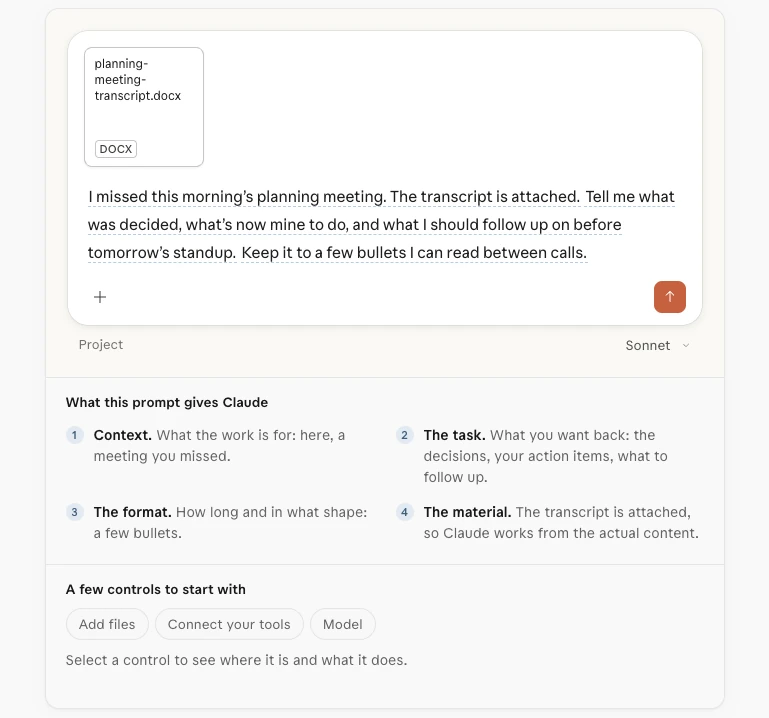
The official Claude Academy example separates context, task, output format, and attached source material.
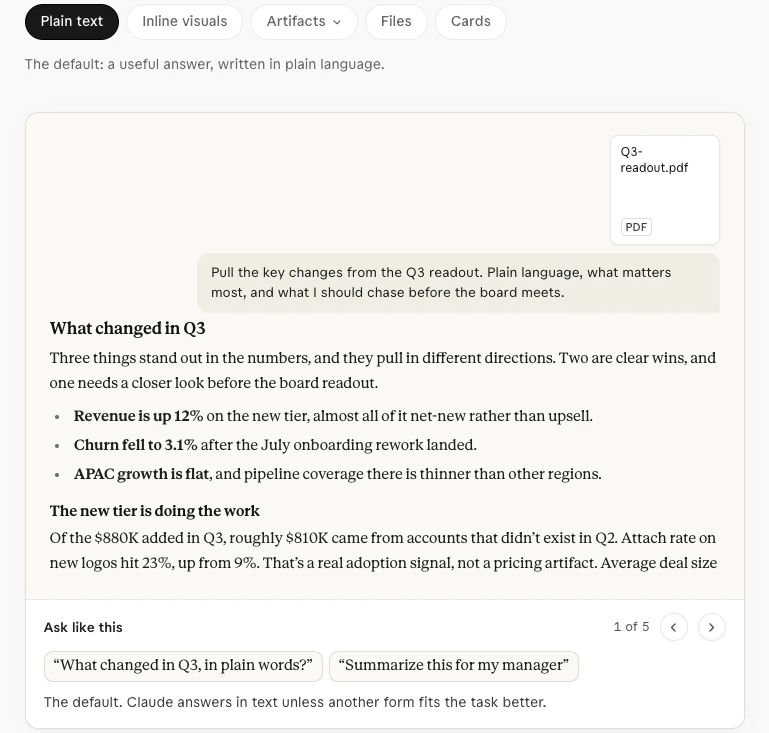
Claude can turn an attached report into a concise, structured answer and then refine it through follow-up requests.
What changed in late 2026?
Anthropic launched Claude Whiteboards and Claude Sheets in beta on November 10, 2026 for paid plans, while Claude Data became generally available. These tools let people organize ideas, edit spreadsheet-style work, and create data stories within Claude. On November 12, Claude Meetings began rolling out in beta for Team and Enterprise plans. It can join Google Meet as a visible participant, take notes, answer questions, and create work during a call. Meetings is not a Free or Pro feature, and teams should obtain consent before transcription.
Pricing and platforms
Pricing was checked on November 24, 2026. Claude Free costs $0 and includes limited usage plus chat on web, desktop, and mobile, web search, file creation and code execution, memory, connectors, Artifacts, and the Design, Slides, and Docs outputs listed on the pricing page. Free usage is limited and resets on a five-hour cycle; the number of messages varies with demand and the work performed.
Claude Pro is $20 per month or $200 per year. The official page displays the annual offer as $17 per month with $200 billed up front. Pro adds more usage and paid capabilities such as Projects and additional work surfaces. Max costs $100 per month and provides five times Pro usage. Ultra costs $200 per month and provides ten times Pro weekly usage; verified Ultra accounts do not have the five-hour limit. Taxes, mobile-store prices, availability, and plan contents may differ.
Supported AIMapGo platform values are Web, iOS, Android, Windows, and macOS. Anthropic also lists Linux and ChromeOS options on its download page, but those are outside AIMapGo’s current platform vocabulary.
Important limitations
- Claude can produce inaccurate, incomplete, or outdated output. Check consequential claims, calculations, quotes, and cited pages before using them.
- Usage is not a fixed message allowance. It depends on conversation length, model, feature, effort, and demand; Anthropic says limits may change.
- Web search and direct web fetch consume usage. A long linked article can use substantially more context than a normal search.
- Current chat uploads allow up to 20 files, 500 MB per file, and 1,000 PDF pages. PDFs over 100 pages are processed as text only, without visual analysis.
- Features may be restricted by plan, region, organization policy, staged rollout, or app version. API usage is billed separately from consumer subscriptions.
- Do not upload confidential or regulated information unless your account, organization controls, and legal requirements permit it.
Claude FAQ
Is Claude free?
Yes. Claude has a $0 Free plan with limited usage. Paid plans provide more capacity and additional features.
Can Claude search the web?
Yes. Claude can search current web content and return citations and source links. Search availability and controls can vary by plan or organization.
Can Claude analyze PDFs and spreadsheets?
Yes. Claude supports PDFs and several document formats. XLSX upload requires file creation or code execution to be enabled. Large PDFs have page and visual-processing limits.
Does Claude have mobile and desktop apps?
Yes. Anthropic provides official iOS and Android apps and Claude Desktop for Windows and macOS.
Is Claude Meetings available on the Free or Pro plan?
No. As of the checked date, Claude Meetings is a beta rolling out to Team and Enterprise plans and currently supports Google Meet.