v0 is Vercel’s AI app builder for turning natural-language prompts, screenshots, Figma designs, or existing repositories into working websites and full-stack web applications. It combines an AI development agent, live preview, visual editing, a full code editor, Git workflows, integrations, and Vercel deployment in one web workspace. It is designed for founders, product teams, designers, developers, marketers, and other users who want to move from an idea to a testable product faster.
What is v0?
v0 is an AI-powered development platform created by Vercel. A user can describe a landing page, dashboard, ecommerce experience, SaaS product, internal tool, AI app, or other web project in ordinary language, and v0 generates real application code with a running preview. Users can then refine the project through chat, Design Mode, or the built-in VS Code-style editor.
v0 supports new projects and existing codebases. It can use screenshots, mockups, Figma files, ZIP uploads, GitHub repositories, and Vercel projects as starting context. The platform is especially familiar with modern web technologies such as Next.js, React, TypeScript, Tailwind CSS, shadcn/ui, and the Vercel AI SDK, while integrations can add databases, authentication, payments, storage, external APIs, and AI models.
Key features and best use cases
Prompt-to-app generation: Describe the users, pages, data, interactions, and visual direction, and v0 creates a working application rather than only a static mockup.
Multimodal design input: Upload a screenshot or mockup, attach a Figma file, or provide a design reference so v0 can translate visual structure into code.
Visual and code editing: Iterate through conversation, adjust elements in Design Mode, or inspect and edit files in the integrated code editor.
Full-stack building: Add databases, authentication, server-side routes, AI features, payments, file storage, and external APIs to create data-driven products.
GitHub workflow: Import repositories, work on automatically created branches, track commits, and open pull requests without pushing directly to the main branch.
Preview and deployment: Run production-like previews in an isolated Vercel Sandbox, then publish to Vercel and connect a domain.
Useful projects include product prototypes, landing pages, company websites, dashboards, booking tools, ecommerce interfaces, customer portals, data visualizations, internal business apps, and AI-powered applications. Non-developers can use prompts and visual controls, while developers can review and change the generated code.
How to use v0
Open v0 and sign in. Start a new chat or project, or import an existing GitHub repository, Vercel project, ZIP file, screenshot, or Figma design.
Write a clear first prompt. Describe the target user, required pages, main actions, data, style, integrations, and success criteria. For a large product, begin with the core workflow instead of requesting every feature at once.
Review the generated preview. Test navigation, forms, responsive layouts, loading states, and the most important user journey.
Iterate in the appropriate mode. Ask for a specific change in chat, use Design Mode for visual adjustments, or edit the underlying code directly.
Connect services. Add databases, authentication, AI models, payments, storage, environment variables, or external APIs when the project requires them.
Use version control when needed. Connect GitHub, review automatic commits, and open a pull request before merging production changes.
Test and publish. Check security, permissions, accessibility, performance, and real data behavior, then publish through Vercel and configure a domain if required.
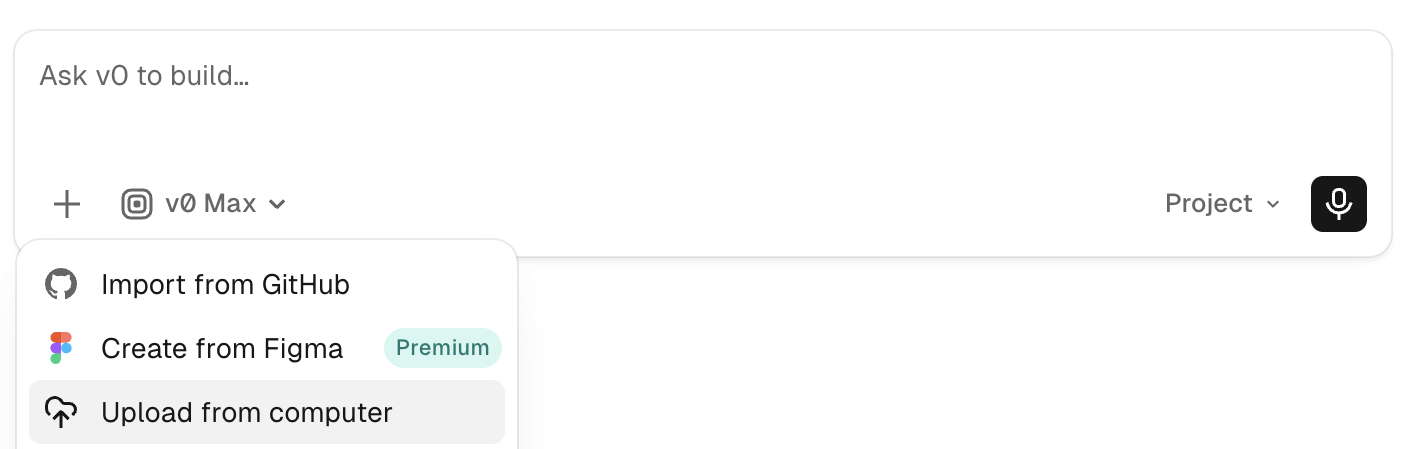
Start from a prompt or bring in an existing GitHub repository, Figma design, screenshot, or local project file.
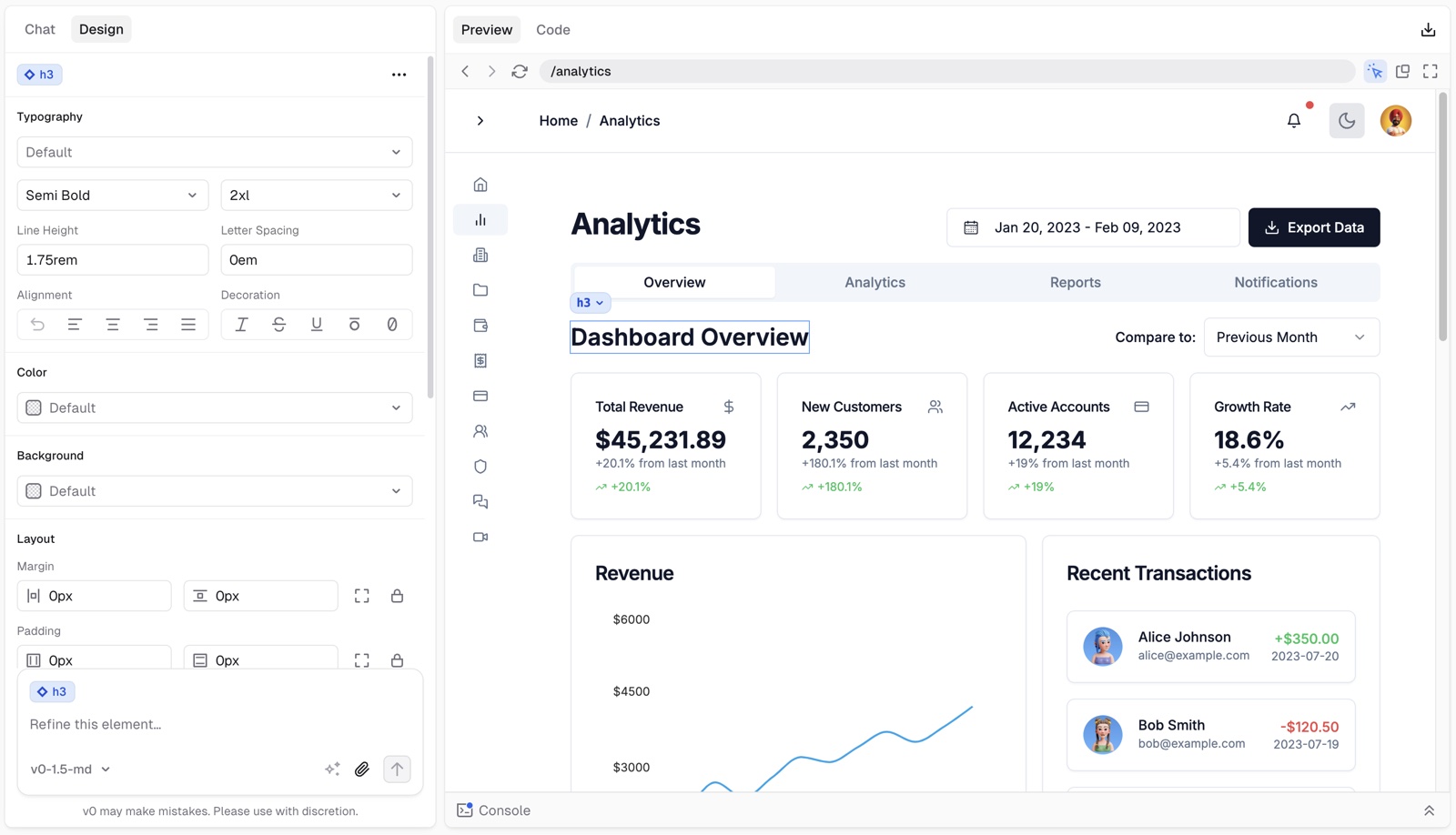
Design Mode lets you select an element in the live preview, adjust its styles, and apply the change back to the source code.
Official v0 video tutorial
Vercel's official beginner tutorial shows how to move from the first prompt to a working application and production deployment in v0.
Watch the official v0 tutorial on YouTube
Pricing and platforms
Pricing was checked on November 19, 2026. v0 uses a freemium model. The current Free plan costs $0 per month and includes access to v0, Vercel deployment, Design Mode, GitHub sync, and a limit of seven messages per day.
The lowest currently offered paid plan for new subscribers is Plus at $30 per user per month. It includes access to all models, $30 in monthly credits per user, $2 in free daily credits when the user logs in, the ability to purchase additional credits, centralized billing, shared chats, and team collaboration. Business costs $100 per user per month and adds training opt-out by default; Enterprise uses custom pricing and adds controls such as SAML SSO, role-based access, priority service, and support SLAs. Some older documentation still mentions a $20 Premium plan, but v0 states that plan is being sunsetted and is unavailable to new users, so it is not used as the starting price here.
v0 works in a desktop web browser and also has an official iOS app for iPhone and iPad. The iOS app supports prompting, generating, iterating, previews, environment variables, GitHub, sharing, database integrations, and selecting existing MCP servers. Configuration of new MCP server presets is currently handled on desktop.
Important limitations
The Free plan is limited to seven messages per day. Paid usage is credit- and token-based, so long prompts, large files, chat history, and complex output can consume more credits.
v0 requires an internet connection and an account. The complete preview, environment, deployment, and domain workflow is most closely integrated with Vercel.
GitHub is optional, but importing a repository requires access to that repository and the Vercel GitHub App. Once connected, the repository becomes the project’s source of truth.
AI-generated applications can contain functional, security, accessibility, or performance problems. Review authentication, data permissions, secrets, payments, dependencies, and generated code before production use.
The iOS app covers many core workflows, but some advanced setup—such as adding new MCP server presets—is still better handled on desktop.
v0 FAQ
Can I use v0 for free?
Yes. The Free plan costs $0 and currently allows seven messages per day, along with Design Mode, GitHub sync, and deployment to Vercel.
Do I need coding experience to use v0?
No. Users can build through natural-language prompts and visual editing. Coding knowledge is still useful for reviewing architecture, security, integrations, and production behavior.
Can v0 work on an existing project?
Yes. v0 can import a GitHub repository, Vercel project, or ZIP file and work with the existing codebase. Repository access and GitHub integration permissions are required for Git-based workflows.
Can v0 build and publish full-stack apps?
Yes. v0 can generate interfaces and backend logic, connect data and external services, run a full preview, and publish through Vercel. The result should still be tested and reviewed before production use.